Dialogues and Payments
A mobile financial application where transfers
within chats are part of everyday
user interaction.
This is one of the most sensitive scenarios
of the product, because it combines two different
contexts: a live dialogue and a financial transaction.
The user expects:
instantaneity
a minimal number of actions
security without the feeling of complexity
Any delay or overload directly affects conversion: if the scenario is perceived
as a "banking process", the user loses
the feeling of simplicity and delays
or cancels the transfer.
Role
Was responsible for the full cycle of redesigning the scenario
for translations within chats: analyzing user
behavior, formulating hypotheses,
designing the structure and interface layout
Business task
Shorten the path to translation within the chat without compromising security and control over the operation


Product problem
Despite the fact that the transfer was integrated
into the chat, the scenario remained torn between two contexts — communication and payment.
Instead of a "quick action within the dialogue"
the user went through a full-fledged banking
process: choosing a recipient, navigating between screens,
checking details, and confirming the operation
This created a gap with the user's expectation
of the "transfer in chat" scenario:
the number of steps increased
the context of the dialogue was lost
the sense of speed and simplicity decreased
the number of errors grew
→ The key problem was
not in individual steps, but in the fragmentation of the scenario
and the loss of a single context
Data (baseline)
users often interrupted the transfer
at the confirmation stage
errors were recorded when selecting bank details
an increase in execution time
of the operation inside the chat was observed
some of the users left for the main
banking scenario instead of
the built-in transfer
users often interrupted the transfer
at the confirmation stage
errors were recorded when selecting bank details
an increase in execution time
of the operation inside the chat was observed
some of the users left for the main
banking scenario instead of
the built-in transfer
Insight
The user does not perceive translation within the chat as a "process."
They expect it to be:
a continuation of the dialogue
a single action
without a change of context
If the scenario is split into screens and decisions, it stops feeling
like a chat and becomes a "banking operation"
The user does not perceive translation within the chat as a "process."
They expect it to be:
a continuation of the dialogue
a single action
without a change of context
If the scenario is split into screens and decisions, it stops feeling
like a chat and becomes a "banking operation"
The user does not perceive translation within a chat as a "process."
They expect it to be:
a continuation of the dialogue
a single action
without changing the context
If the scenario is split into screens and decisions, it stops feeling
like a chat and becomes a "banking operation"

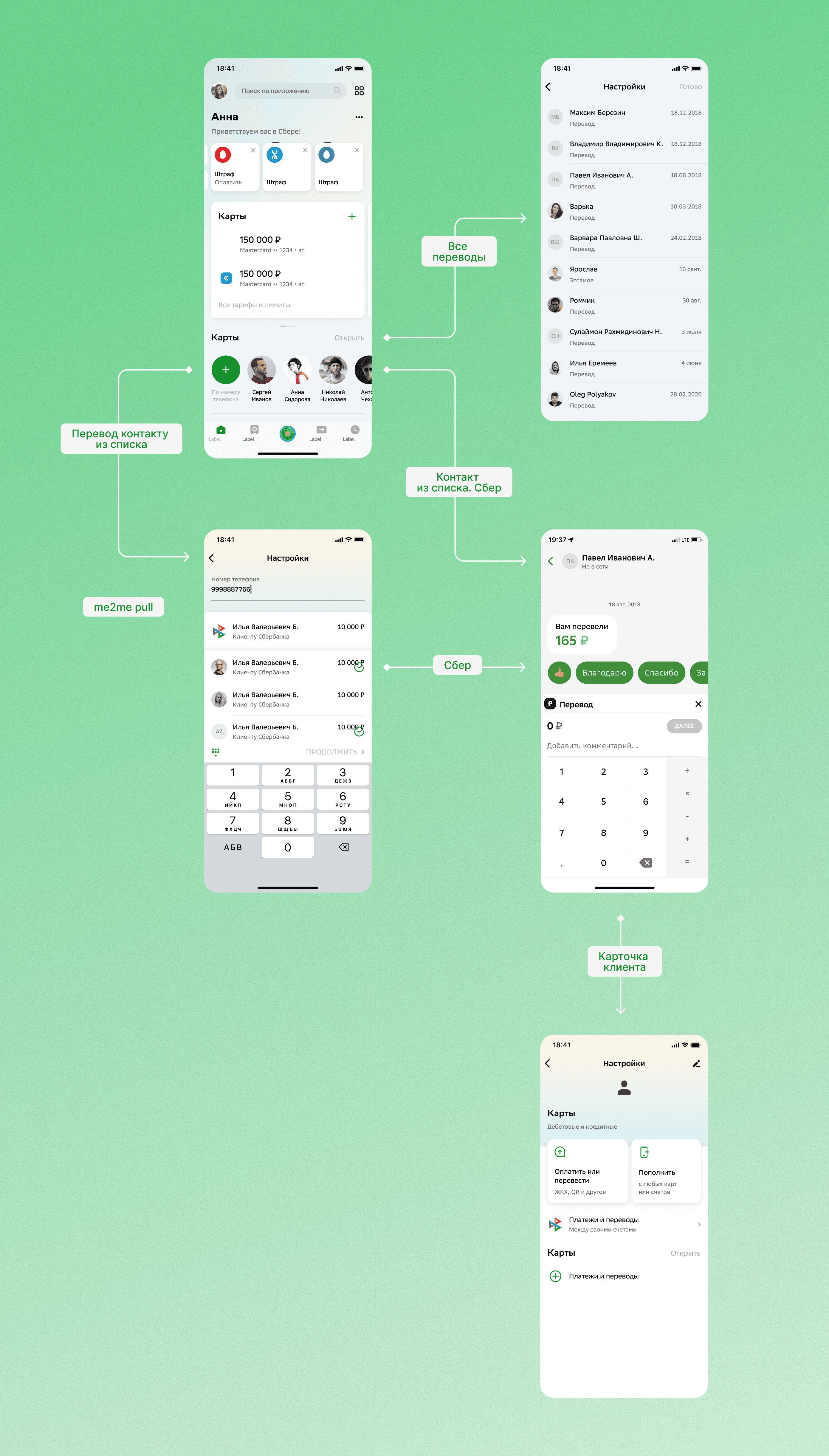
If you combine the translation steps into a single linear flow within the chat and reduce the number of transitions, you can speed up the scenario without sacrificing security
Hypothesis
If you combine the translation steps into a single linear flow within the chat and reduce the number of transitions, you can speed up the scenario without sacrificing security
cannot remove the mandatory confirmation step
it is necessary to preserve the validation of details and card selection
the scenario must work for different types of transfers
→ the solution should have increased speed through structure, rather than by removing steps
Limitations
Redesigned the translation architecture so
that it runs within a single
context—the chat.
removed intermediate screens
combined selection and confirmation steps
eliminated re-confirmations of already selected data
→ translation is now perceived as a single action rather than a chain of operations
Shortening the script and transitions
Solutions
The scenario was integrated so that:
the user did not leave the dialogue
the transfer felt like part of the communication
actions were performed in a single flow
→ the "fork" between the chat
and the payment scenario has disappeared
Saving chat context
Smart defaults
Simplifying amount entry
To reduce the number of decisions:
the primary card for debiting is preselected
recent recipients are added
frequently used parameters are suggested
→ the interface began to predict the user's action, while preserving the possibility of
manual changes
Since this is a key step in the scenario:
automatic
amount formatting has been added
constraints and validation
at the moment of input have been implemented
the probability of input errors has been reduced
→ the user completes
the most sensitive step of the operation faster
I divided the scenario into two layers:
mandatory actions (security, confirmation)
redundant actions (transitions, repeated confirmations, extra screens)
Next, the focus shifted to combining the mandatory steps into a single flow inside the chat
Approach
The transaction row has been redesigned
to form a clear perception
structure:
the amount is highlighted as the main
visual anchor
the transaction type is grouped with the amount
into a single semantic block
the transaction status is available without
going into details
→ the interface now supports scanning
instead of requiring each line to be read
Each transaction has been redesigned
as a self-sufficient element:
statuses added (completed /
in progress / declined)
short explanations of the operation type added
formatting improved for faster
reading
→ the user gets sufficient
context without the need to
open details
Visual and semantic hierarchy
Context of operations
Solutions
The role of filters was redesigned:
integrated into the main search scenario
simplified application logic
added visual feedback
on active states
reduced cognitive cost
of use
→ filters have become part of the basic scenario,
rather than a separate tool
List structure
Filters
Secondary elements have been removed
information density per line has been reduced
the visual rhythm of the list has been aligned
→ key data can now be read
faster and more consistently
Reducing visual noise
margins, padding, and visual rhythm have been redesigned
elements are grouped into logical blocks
visual noise density has been reduced
list scannability has been improved
→ information is perceived
in a structured way, rather than as a stream of text


it was impossible to completely remove the operation confirmation
it was impossible to remove the selection of payment details
it was impossible to simplify the scenario by removing the control
→ simplification was only possible by combining steps and reducing transitions
Trade-offs
Errors
At an early stage, simplifying individual screens was considered
without changing the structure of the scenario.
This did not solve the problem because:
the user still lost the chat context
the scenario remained fragmented
→ conclusion: the problem was not with the UI, but with the fragmentation of contexts
At an early stage, simplifying individual screens without changing the scenario structure was considered.
This did not solve the problem because:
the user still lost
the chat context
the scenario remained fragmented
→ conclusion: the problem was not with the UI, but with the fragmentation of contexts
the scenario must remain in a single context
the steps must be linear, not scattered
security must not increase the cognitive load
the interface must "assemble" actions, not fragment them
Key principles
Results
Secondary elements removed
information density in the row has been reduced
visual rhythm of the list has been aligned
→ key data can now be read faster and more consistently
Reducing visual noise
The role of filters was redesigned:
integrated into the main search scenario
simplified application logic
added visual feedback on active states
reduced cognitive cost of use
→ filters became part of the basic scenario, rather than a separate tool
Filters
Indentations and visual rhythm have been redesigned
elements are grouped into logical blocks
visual noise density is reduced
scannability of the list is improved
→ information is perceived in a structured way rather than as a stream of text
List structure
Each transaction has been redesigned as a self-contained element:
added statuses (completed / processing / declined)
added short explanations of the operation type
improved formatting for faster scanning
→ the user gets sufficient context without the need to open details
Context of operations
The transaction row has been redesigned to form a clear structure of perception:
the amount is highlighted as the main visual anchor
the transaction type is grouped with the amount into a single semantic block
the transaction status is available without going into details
→ the interface now supports scanning instead of requiring reading every line
Visual and semantic hierarchy
Solution design
−32% reduction in the number of steps to complete a transfer
−24% decrease in errors when entering details and amounts
−21% reduction in transfer execution time within the chat
+18% growth in successfully completed transfers without interrupting the scenario
+27% increase in the share of users completing transfers without leaving the chat
→ the scenario began to be perceived as a single action within the dialogue, rather than as a separate banking process
Dialogues and Payments
A messaging and payments hub that allows users to chat with support and manage transfers in one place—with clear statuses, receipts, and real-time updates
Results
— Reduced the number of steps to complete a transfer within a dialogue by 25%
— Increased the speed of entering the amount and confirming the payment by 30%
— Reduced the time to select the recipient's card
and bank by 22%
— Reduced the number of errors when entering transfer data and payment information by 35%
Task
The money transfer scenario within dialogues was overloaded with extra steps: it was difficult for users to quickly select the recipient, card, and transfer amount. Entering data took more time,
and the interaction logic during payment was not clear enough
Solution
Redesigned the UX flow of transfers within dialogues: simplified the screen structure, optimized the selection of recipient and card, improved amount entry, and added quick transfer confirmation scenarios
Process
— Analysis of user scenarios of transfers within dialogues
— Redesign of transfer screens and recipient selection scenario
— Designing the UX logic of entering the amount
and confirming the transaction
— UI design of selecting recipient cards and banks
— Testing transfer scenarios
and user interactions
with payments
Dialogues and Payments
Dialogues and payments are one of the key user scenarios within a fintech product.
Users use this flow to:
send money
discuss transfers
share account details
check transaction statuses
quickly interact within a financial context
Despite the high frequency of use, the existing UX created friction within key scenarios.
Users needed more time to find the right actions,
understand transfer status, and perform financial operations.
The goal of the project is to make the transfer and communication scenario faster,
more understandable and more predictable
Role
Was responsible for the full cycle of redesigning the transaction history scenario: analyzing user behavior, formulating hypotheses, designing the solution, and interface design.
UX audit of the current solution
discovery and analysis of user scenarios
formation of UX hypotheses
redesign mobile experience
payment flow design
creation of a UI concept
development of the component system
Area of responsibility:

Product problem
The current scenario combined:
cognitive overload
navigation complexity
loss of focus
high friction within the flow
This was especially evident in mobile usage, where users
expected the fastest possible actions
chat
payments
actions with transfers
financial statuses
transaction confirmations
attachments and requisites
Due to the high density of features, the interface created:
Project goals
1. Business Goals
2. Product goals
3. UX Goals
increase the frequency of using transfers
increase engagement in P2P scenarios
reduce the number of errors during transfers
increase user trust in financial transactions
reduce translation execution time
decrease the number of steps within the scenario
simplify the navigation flow
improve the readability of financial actions
increase interface predictability
reduce cognitive load
improve visual hierarchy
separate communication and payment layers
make financial actions more prominent
_________________________________________________________________________________________________________________________
_________________________________________________________________________________________________________________________

Research
/ UX Audit:
Allowed to identify problems in navigation, visual hierarchy, and interface structure
/ User scenario analysis:
Helped define the main actions within the transaction history section
/ Competitive research:
Solutions of banking and fintech products were studied to compare approaches
to filtering, searching, and displaying transactions
/ Interviews and feedback:
Recurring user issues
and behavior patterns were analyzed
What was important to understand
Before starting the design, it was important to determine:
which actions are the most frequent
where users waste time
which interface elements create overload
how users perceive financial statuses
which scenarios cause uncertainty
Methods Used
1. UX audit
2. Competitive research
3. User scenario analysis
4. User behavior analysis
Allowed revealing problems with navigation and visual hierarchy
The fintech and messaging products were studied for analysis:
user behavior patterns during payment
communication scenarios within the chat
transaction confirmation screens
user scenarios for mobile transfers
Helped identify the most frequent actions and critical friction points
Allowed for the identification of recurring errors and points of uncertainty within the flow
___________________________________________________________________________________________________________
___________________________________________________________________________________________________________
___________________________________________________________________________________________________________


Key observations
1. Users wanted to perform actions faster
2. Key scenarios were lost among secondary ones
3. The interface required a high cognitive load
Most users did not perceive the scenario as a full-fledged chat.
The main task is to quickly perform a transfer or check the status of an operation
CTAs and statuses competed with messages and created visual noise.
This made the scanability of the interface more difficult.
Insufficient transparency of confirmations and statuses reduced confidence within the scenario
___________________________________________________________________________________________________________
___________________________________________________________________________________________________________
JTBD
When
I want to do this quickly and without errors
I want to clearly see financial actions and statuses
I want to translate in the minimum number of steps
When I discuss translation inside the chat
When I use the mobile application
To be sure that the translation is done correctly
So as not to lose important information among messages
In order not to waste extra time on the navigation flow
I need to send money to someone
___________________________________________________________________________________________________________
___________________________________________________________________________________________________________
Hypotheses
Hypothesis 1
Hypothesis 2
Hypothesis 3
Why we calculated it this way:
If you separate the communication layer and the payment layer,
users will perceive the interface faster.
Why we calculated it this way:
financial actions were lost among messages
the interface looked overloaded
users needed more time to scan
operation statuses were not sufficiently noticeable
CTAs did not have sufficient visual priority
the script contained unnecessary actions
the mobile flow was not optimized enough
If the visual hierarchy of financial actions is strengthened,
users will make fewer mistakes
Why we calculated it this way:
If you reduce the number of steps within the flow,
the transfer completion time will decrease.
___________________________________________________________________________________________________________
___________________________________________________________________________________________________________
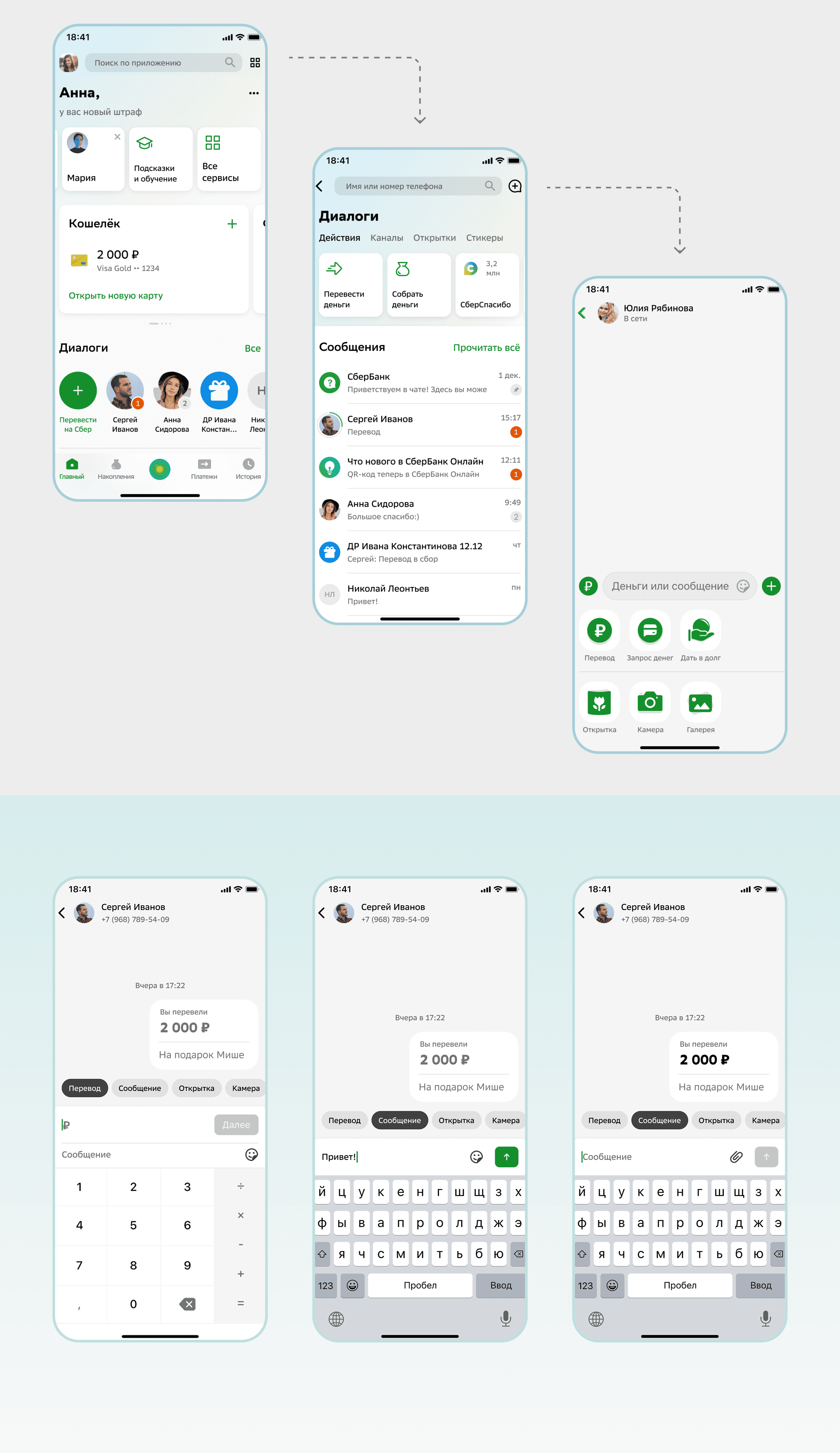
Trades off
During the design process, it was important to maintain a balance between:
interface simplicity
number of features
script execution speed
separate hierarchy
visual accents
more understandable confirmation patterns
Initially, an option with a large number of built-in actions inside the chat was considered. However, this approach created clutter and worsened the scanability of the interface.
As a result, the key financial actions received:
User flow
Main scenario
User opens the dialog
Selects the transfer action
Enters the amount
Verifies the transaction details
Confirms the transfer
Receives the execution status
The main goal was to reduce friction and make the flow as predictable as possible

UX solutions
1. Separation of communication and payment layers
3. Reducing cognitive load
4. Mobile UX Optimization
2. Simplifying the translation scenario
operation status
transfer success
next step
available actions
touch interactions have been improved
the number of actions has been reduced
interface scanability has been enhanced
readability of statuses and CTAs has been improved
extra steps
repeated confirmations
visual clutter within the flow
Financial actions received:
The user now understands faster:
In the mobile version:
The following have been redesigned:
This made it possible to speed up the execution of key actions
___________________________________________________________________________________________________________
___________________________________________________________________________________________________________
___________________________________________________________________________________________________________
a separate visual hierarchy
improved statuses
more prominent CTAs
clear confirmation patterns
Iterations
First concept
What the review showed
In the final decision
Initially, the interface contained more built-in actions inside the chat.
This approach made the scenario more functional, but visually overloaded the interface
During the analysis, it became clear that users lose focus and spend too much time scanning
communication and payment layers were visually separated
CTAs were given higher priority
statuses became more visible
flow became shorter and clearer
___________________________________________________________________________________________________________
___________________________________________________________________________________________________________

Efficiency of solutions
After the redesign, the main focus was on:
reduction of errors
decrease in translation time
growth of interaction with the payment flow
usability improvement
translation execution speed
error rates
completion rate
user engagement
scenario execution time
The key performance indicators were:
Results
Efficiency assessment
After the redesign, the main focus was on:
The key performance indicators were:
translation execution speed
error rates
completion rate
user engagement
scenario execution time
reduction of errors
decrease in translation time
increase in engagement with the payment flow
improvement of usability
___________________________________________________________________________________________________________
+18% completion rate
−25% translation errors
+20% engagement
−30% scenario time
mobile UX improvement
Review
This project helped me work more deeply with:
The main result for me was the creation of a scenario that helps users perform financial actions faster without overload and uncertainty within the flow
fintech UX
payment flows
mobile-first design
communication patterns
trust-oriented interfaces
Dialogues and Payments
Dialogues and payments are one of the key user scenarios within a fintech product.
Users use this flow to:
send money
discuss transfers
share account details
check transaction statuses
quickly interact within a financial context
Despite the high frequency of use, the existing UX created friction within key scenarios.
Users needed more time to find the right actions,
understand transfer status, and perform financial operations.
The goal of the project is to make the transfer and communication scenario faster,
more understandable and more predictable
Role
Was responsible for the full cycle of redesigning the transaction history scenario: analyzing user behavior, formulating hypotheses, designing the solution, and interface design.
UX audit of the current solution
discovery and analysis of user scenarios
formation of UX hypotheses
redesign mobile experience
payment flow design
creation of a UI concept
development of the component system
Area of responsibility:
Product problem
The current scenario combined:
cognitive overload
navigation complexity
loss of focus
high friction within the flow
This was especially evident in mobile usage, where users
expected the fastest possible actions
chat
payments
actions with transfers
financial statuses
transaction confirmations
attachments and requisites
Due to the high density of features, the interface created:
Project goals
1. Business Goals
2. Product goals
3. UX Goals
increase the frequency of using transfers
increase engagement in P2P scenarios
reduce the number of errors during transfers
increase user trust in financial transactions
reduce translation execution time
decrease the number of steps within the scenario
simplify the navigation flow
improve the readability of financial actions
increase interface predictability
reduce cognitive load
improve visual hierarchy
separate communication and payment layers
make financial actions more prominent
_________________________________________________________________________________________________________________________
_________________________________________________________________________________________________________________________
Research
/ UX Audit:
Allowed to identify problems in navigation, visual hierarchy, and interface structure
/ User scenario analysis:
Helped define the main actions within the transaction history section
/ Competitive research:
Solutions of banking and fintech products were studied to compare approaches
to filtering, searching, and displaying transactions
/ Interviews and feedback:
Recurring user issues
and behavior patterns were analyzed
What was important to understand
Before starting the design, it was important to determine:
which actions are the most frequent
where users waste time
which interface elements create overload
how users perceive financial statuses
which scenarios cause uncertainty
Methods Used
1. UX audit
2. Competitive research
3. User scenario analysis
4. User behavior analysis
Allowed revealing problems with navigation and visual hierarchy
The fintech and messaging products were studied for analysis:
user behavior patterns during payment
communication scenarios within the chat
transaction confirmation screens
user scenarios for mobile transfers
Helped identify the most frequent actions and critical friction points
Allowed for the identification of recurring errors and points of uncertainty within the flow
___________________________________________________________________________________________________________
___________________________________________________________________________________________________________
___________________________________________________________________________________________________________
Key observations
1. Users wanted to perform actions faster
2. Key scenarios were lost among secondary ones
3. The interface required a high cognitive load
Most users did not perceive the scenario as a full-fledged chat.
The main task is to quickly perform a transfer or check the status of an operation
CTAs and statuses competed with messages and created visual noise.
This made the scanability of the interface more difficult.
Insufficient transparency of confirmations and statuses reduced confidence within the scenario
___________________________________________________________________________________________________________
___________________________________________________________________________________________________________
JTBD
When
I want to do this quickly and without errors
I want to clearly see financial actions and statuses
I want to translate in the minimum number of steps
When I discuss translation inside the chat
When I use the mobile application
To be sure that the translation is done correctly
So as not to lose important information among messages
In order not to waste extra time on the navigation flow
I need to send money to someone
___________________________________________________________________________________________________________
___________________________________________________________________________________________________________
Hypotheses
Hypothesis 1
Hypothesis 2
Hypothesis 3
Why we calculated it this way:
If you separate the communication layer and the payment layer,
users will perceive the interface faster.
Why we calculated it this way:
financial actions were lost among messages
the interface looked overloaded
users needed more time to scan
operation statuses were not sufficiently noticeable
CTAs did not have sufficient visual priority
the script contained unnecessary actions
the mobile flow was not optimized enough
If the visual hierarchy of financial actions is strengthened,
users will make fewer mistakes
Why we calculated it this way:
If you reduce the number of steps within the flow,
the transfer completion time will decrease.
___________________________________________________________________________________________________________
___________________________________________________________________________________________________________
Trades off
During the design process, it was important to maintain a balance between:
interface simplicity
number of features
script execution speed
separate hierarchy
visual accents
more understandable confirmation patterns
Initially, an option with a large number of built-in actions inside the chat was considered. However, this approach created clutter and worsened the scanability of the interface.
As a result, the key financial actions received:
User flow
Main scenario
User opens the dialog
Selects the transfer action
Enters the amount
Verifies the transaction details
Confirms the transfer
Receives the execution status
The main goal was to reduce friction and make the flow as predictable as possible
UX solutions
1. Separation of communication and payment layers
3. Reducing cognitive load
4. Mobile UX Optimization
2. Simplifying the translation scenario
operation status
transfer success
next step
available actions
touch interactions have been improved
the number of actions has been reduced
interface scanability has been enhanced
readability of statuses and CTAs has been improved
extra steps
repeated confirmations
visual clutter within the flow
Financial actions received:
The user now understands faster:
In the mobile version:
The following have been redesigned:
This made it possible to speed up the execution of key actions
___________________________________________________________________________________________________________
___________________________________________________________________________________________________________
___________________________________________________________________________________________________________
a separate visual hierarchy
improved statuses
more prominent CTAs
clear confirmation patterns
Iterations
First concept
What the review showed
In the final decision
Initially, the interface contained more built-in actions inside the chat.
This approach made the scenario more functional, but visually overloaded the interface
During the analysis, it became clear that users lose focus and spend too much time scanning
communication and payment layers were visually separated
CTAs were given higher priority
statuses became more visible
flow became shorter and clearer
___________________________________________________________________________________________________________
___________________________________________________________________________________________________________
Efficiency of solutions
After the redesign, the main focus was on:
reduction of errors
decrease in translation time
growth of interaction with the payment flow
usability improvement
translation execution speed
error rates
completion rate
user engagement
scenario execution time
The key performance indicators were:
Results
Efficiency assessment
After the redesign, the main focus was on:
The key performance indicators were:
translation execution speed
error rates
completion rate
user engagement
scenario execution time
reduction of errors
decrease in translation time
increase in engagement with the payment flow
improvement of usability
___________________________________________________________________________________________________________
+18% completion rate
−25% translation errors
+20% engagement
−30% scenario time
mobile UX improvement
Review
This project helped me work more deeply with:
The main result for me was the creation of a scenario that helps users perform financial actions faster without overload and uncertainty within the flow
fintech UX
payment flows
mobile-first design
communication patterns
trust-oriented interfaces